CreatorConfig is supported by its audience. We may earn commissions from qualifying purchases through affiliate links on this page. Full disclosure
What is an XLR mixer?
An XLR mixer is a mixer with XLR microphone inputs that supply preamp gain and, when you switch it on, 48V phantom power, then combine those mics into one mix your PC receives over USB. For one microphone, buy the Yamaha ZG02; for four or more, the Zoom LiveTrak L-8.
Below are five XLR audio mixers compared on the four things that decide the purchase: how many XLR inputs they have, how much preamp gain the manufacturer publishes, what processing runs on the box, and what reaches your computer over USB. If you are buying an XLR mic and mixer together, the matched pairings further down price both halves plus the cable you will need. Every figure on this page comes from the manufacturer's own documentation.
The Ruling
What is the best XLR mixer?Get the Yamaha ZG02.
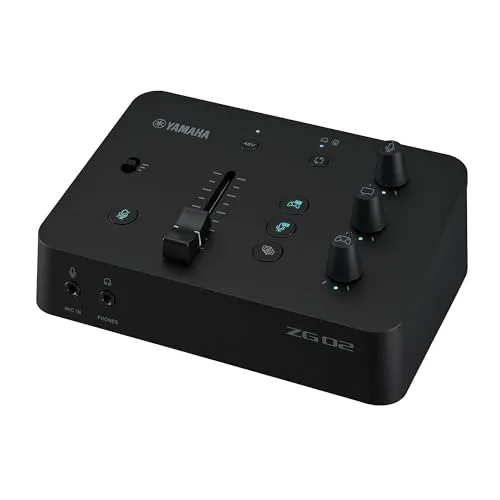
The Yamaha ZG02 is the best XLR mixer for most creators, because it gives you one XLR/TRS combo input, 48V phantom power and a three-position gain switch topping out at +50 dB over a single USB-C cable, which is everything a solo streamer or voice-over artist needs and nothing they do not.
Unless…
- You want multitrack recording. Get the Zoom LiveTrak L-8.Six XLR combo inputs, six sound pads and 12-track recording, with battery power on top.
- You need more than one XLR input with real processing. Get the Rode RODECaster Pro II.Full APHEX on all four channels, and every channel recorded as its own file to microSD.
- Two XLR inputs on a budget is the whole brief. Get the Behringer 802S.Two Xenyx preamps with 48V, 3-band EQ on both mic channels, and a 2x2 USB interface built in.
The full ranking
- Best overall:Yamaha ZG02, one XLR input, +50 dB gain switch, single-cable USB-C setup
- Best budget:Behringer 802S, two Xenyx XLR preamps with 3-band EQ and a 2x2 USB interface
- Best for podcasting:Zoom LiveTrak L-8, six XLR combo inputs, six sound pads, 12-track multitrack
- Best premium compact:Rode RODECaster Duo, two XLR inputs with the APHEX suite and 76 dB of gain
- Best for four-mic production:Rode RODECaster Pro II, full APHEX on all four channels, multitrack to microSD
Every XLR audio mixer below supplies 48V phantom power and mic preamp gain, so the real decision is how many microphones you run, whether you want processing on the box, and whether you need multitrack recording. Buying an XLR mic and mixer at once? Jump to the matched combos.
At a Glance
How the three real contenders compare
Because every mixer here clears the same phantom-power and preamp bar, the chart is a picture of scale rather than quality. The ZG02 is a deliberate point: one input, one cable, and nothing else to configure. The L-8 and the Pro II grow in every direction and give back the one axis the ZG02 wins outright. The L-8 leads on inputs because Zoom publishes six XLR/TRS combo jacks against the Pro II's four.
Each spoke runs 0 at the center to 10 at the outer ring.
- Yamaha ZG02Our pick. One XLR input, one cable.
- Zoom LiveTrak L-8Take it instead for podcasting and multitrack.
- Rode RODECaster Pro IITake it instead for four-mic production.
| Category | Yamaha ZG02 | Zoom LiveTrak L-8 | Rode RODECaster Pro II |
|---|---|---|---|
| XLR Inputs | 2/10 | 10/10 | 7/10 |
| Hardware Processing | 3/10 | 3/10 | 10/10 |
| Multitrack Recording | 1/10 | 10/10 | 9/10 |
| Sound Pads | 1/10 | 8/10 | 10/10 |
| Simplicity | 10/10 | 4/10 | 4/10 |
Quick Comparison: Best Mixers for XLR Mics
Yamaha ZG02
Most Users
Behringer 802S
Budget
Zoom LiveTrak L-8
Podcasting
Rode RODECaster Duo
Premium Compact
Rode RODECaster Pro II
Ultimate Console
Yamaha ZG02
Key Specifications
The Yamaha ZG02 is the best overall mixer for XLR microphone users who want a compact, all-in-one answer for streaming, voice-over, or content creation. Yamaha specifies a single XLR/TRS combo input with 48V phantom power, so it runs a professional condenser or a dynamic XLR mic out of the box. Note that the phantom power reaches the XLR connector only, not the separate 3.5 mm headset mic input.
Gain is set with a three-position switch rather than a continuous knob: +20 dB, +35 dB or +50 dB. That +50 dB ceiling is the lowest published figure of any mixer in this guide, which matters if you are pairing it with a very quiet dynamic. Everything converts at 24-bit/48 kHz, and the PC-facing USB-C port carries 10 channels in and 4 out while also powering the unit, so one cable does audio and power together.
On the box, the mic effects buttons are voice changer, a censor beep and echo. The gate, compressor, EQ and limiter that people associate with the ZG range live in Yamaha's free ZG Controller desktop app, not on the hardware, so treat those as software you configure once rather than knobs you reach for mid-stream. A second USB-C port marked CONSOLE handles a games console at 16-bit/48 kHz, which is why the ZG02 also turns up in our best audio mixer for PS5 guide.
For XLR mic users who do not need multiple inputs, the ZG02 is the simplest complete answer here: phantom power, a real mic preamp and a USB audio interface in a package that fits under a monitor.
Why it wins
- • XLR combo input with 48V phantom power
- • 24-bit/48 kHz, 10-in/4-out over USB-C
- • Compact, single-cable USB-C setup
Skip if
- • You need more than one XLR input
- • You want multitrack recording
- • You need more than +50 dB of gain
Behringer 802S
Key Specifications
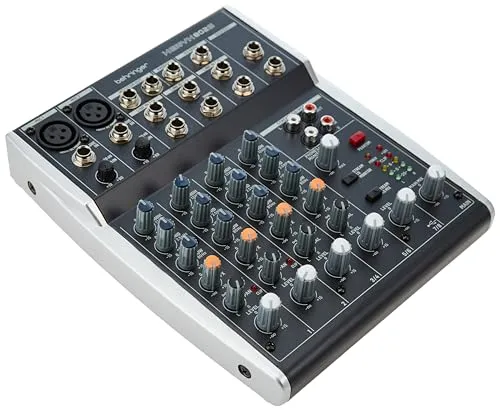
The Behringer 802S is the best budget mixer for XLR mic owners who need more than one microphone input without spending several hundred dollars. It provides two Xenyx mic preamps with switchable 48V phantom power, an 8-input analog architecture, and, despite the fully analog controls, an integrated 2x2 USB audio interface. The S in the name is for Streaming: this is the Xenyx model built to connect straight to a computer, and it does so over a USB-B cable.
Each mic channel gets its own gain knob, a 3-band EQ and a level fader, and the stereo inputs get EQ too. That physical control matters when you are running two microphones of different sensitivity, such as a condenser for vocals and a dynamic for a co-host. There is one FX send per channel for an outboard processor. What the 802S does not have is a compressor: Behringer's feature list for this model covers the preamps, phantom power, EQ and the FX send, and the one-knob compressor belongs to other Xenyx models such as the X1204USB. Behringer does not publish a maximum mic gain figure for the 802S, so we do not quote one.
Over USB the 802S is 2-in/2-out, which means your computer receives the finished stereo mix rather than each microphone separately. That is the trade for the price. There is also a stereo RCA streaming input and a stereo USB return, so music or a call can be folded into the mix before it leaves the desk. If you need two XLR inputs and do not want to spend more than a single-channel audio interface costs, the 802S is the most practical choice here. Our best budget audio mixer for streaming guide covers the rest of that price bracket.
Why it wins
- • Two XLR inputs with phantom power on a budget
- • Integrated 2x2 USB audio interface
- • Physical gain, EQ and fader per mic channel
Skip if
- • You need onboard compression or digital effects
- • You want multitrack recording per channel
- • You need more than two XLR inputs
Zoom LiveTrak L-8
Key Specifications
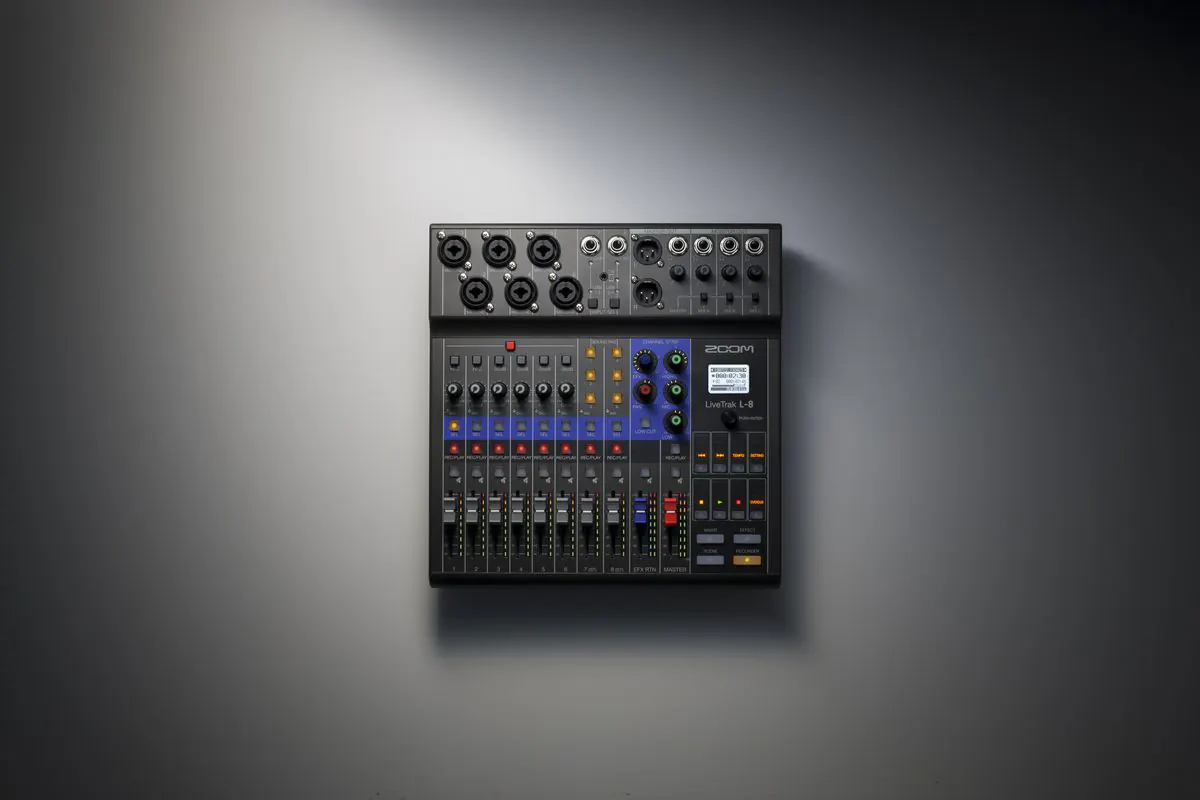
The Zoom LiveTrak L-8 is the best mixer for XLR mic users who need several microphone inputs and want recording tools built into the desk. Zoom specifies six MIC/LINE XLR/TRS combo jacks, not four, plus two TS line inputs and a TRRS smartphone jack for a call-in guest. Each mic channel has its own gain knob covering +10 to +54 dB, with Hi-Z on channels 1 and 2 and a 26 dB pad on channels 3 to 6. Six assignable sound pads carry 13 preset sounds for intros, stings and transitions.
Phantom power is worth understanding before you buy: the L-8 has a single 48V switch that feeds inputs 1 to 6 together. You cannot power channel 1 and leave channel 2 unpowered, so a mixed rig of condensers and dynamics runs with 48V on across the board. That is safe for modern balanced dynamics, as the phantom power section below explains, but it is a design choice the spec sheet states plainly and the marketing does not.
Recording is where the L-8 earns the podcasting pick. It captures 12 tracks at once to an SD card, channels 1 to 6 as mono WAV files, channels 7/8 as a stereo pair and the master as its own stereo file, at 44.1, 48 or 96 kHz in 16- or 24-bit. The number 8 in the name is the channel count, not the track count. As a USB interface it is 12-in/4-out at 24-bit, so every microphone reaches your DAW or OBS separately rather than pre-mixed, and the MASTER OUT is a pair of balanced XLR connectors for powered monitors or a PA. There are four headphone jacks in total: one master and three MONITOR OUT channels with their own separate mixes.
Power is the last advantage. Zoom lists four AA cells, a 5 V AD-17 adapter or USB bus power, which makes the L-8 viable for field recording and live events as well as a desk. If you need six XLR inputs, sound pads and genuine multitrack in one unit, this is the most complete podcasting mixer in this guide.
Why it wins
- • Six XLR combo inputs with 48V phantom power
- • 12 tracks to SD and 12-in/4-out over USB
- • Balanced XLR master outs and battery power
Skip if
- • You only need one or two XLR inputs
- • You want per-channel APHEX-style processing
- • You need phantom power switched per channel
Rode RODECaster Duo
Key Specifications
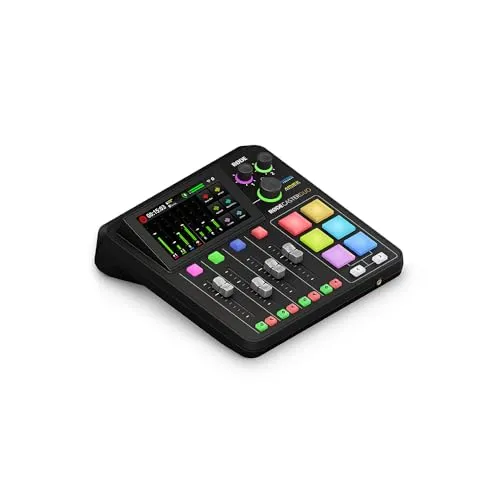
The Rode RODECaster Duo is a premium compact mixer built around two Neutrik XLR/TRS combo inputs with the APHEX processing suite on board. Rode publishes its Revolution Preamps at 76 dB of gain with -131.5 dBV EIN, the highest published gain figure on this page alongside the Pro II, which is the reason the Duo comes up so often for low-output dynamics like the Shure SM7B and MV7X.
Per channel you get a compressor, noise gate, high-pass filter, de-esser and 3-band EQ, plus the APHEX Aural Exciter, Big Bottom and the Compellor master compressor and leveller across the mix. Everything runs at 24-bit/48 kHz. The desk has seven assignable channels, four physical faders and three virtual, and six programmable SMART pads with bank switching for sound effects, music cues and mix presets. Two USB-C interfaces let you connect two computers or devices at once.
The Duo also records: Rode lists stereo or individual multitrack files written to a microSD card or USB storage, as WAV or MP3. That corrects a common assumption that only the Pro II and the LiveTrak L-8 multitrack in this class. If you run one or two XLR microphones and want processing and recording handled on the box rather than in software, the Duo is the compact version of the Pro II with the same preamps.
Why it wins
- • 76 dB of published preamp gain
- • Full APHEX suite plus per-channel compressor and EQ
- • Multitrack recording to microSD or USB storage
Skip if
- • You need more than two XLR inputs
- • You are on a tight budget
- • You do not need processing on the box
Rode RODECaster Pro II
Key Specifications
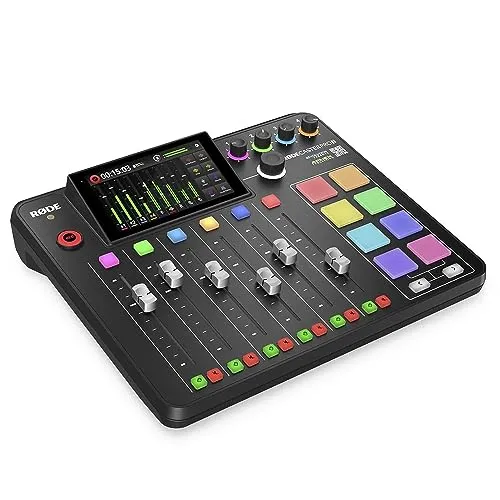
The Rode RODECaster Pro II is the top XLR mixer here for creators who need four microphone inputs, full APHEX processing on every channel, and a production console that replaces a software effects chain. It has four Neutrik XLR/TRS combo inputs with the same Revolution Preamps as the Duo: 76 dB of published gain and -131.5 dBV EIN, the most gain of anything in this guide by a wide margin. Each channel carries a compressor, noise gate, high-pass filter, de-esser and 3-band EQ, alongside APHEX Aural Exciter, Big Bottom and Compellor.
Phantom power is switched per channel from the channel setup screen, which is the practical difference from the LiveTrak L-8's single global switch. Pick your microphone from the built-in mic locker and the Pro II sets level, voicing and phantom power for you, or toggle 48V by hand. Nine channels are individually assignable across six physical faders and three virtual ones, and the eight programmable SMART pads have eight banks behind them, which works out to 64 possible actions.
The built-in recorder writes every channel as its own file, plus the stereo mix, to a microSD card or a USB drive, so a full multitrack podcast happens with no DAW running. On the computer side there are two USB-C interfaces: USB 1 carries multitrack audio and MIDI to a computer, USB 2 carries stereo from a second device. Rode does not publish the USB multitrack channel count, so treat the recorder and the interface as separate capabilities.
This is the mixer to buy when your XLR microphone setup has outgrown a basic interface and you need a production hub. It handles four microphones, processes each one independently, records multitrack and plays back sounds from the pads, all at 24-bit/48 kHz.
Why it wins
- • Four XLR inputs with full per-channel APHEX
- • 76 dB of gain and per-channel 48V switching
- • Records every channel as its own file to microSD
Skip if
- • You only need one or two XLR inputs
- • The price is beyond your budget
- • You need more than four XLR inputs
How to Connect an XLR Mic to a Mixer, and the Mixer to a PC
An XLR mic and mixer connect in four steps, and the whole chain is microphone, XLR cable, combo input, gain, then USB to the computer. Nothing else is required.
1. Microphone to mixer
Plug the male end of an XLR cable into the microphone and the female end into a MIC or MIC/LINE combo jack on the mixer. Buy one cable per microphone: an XLR cable is almost never included with either the mic or the mixer, which is why every combo priced below includes one.
2. Phantom power, if the mic is a condenser
Switch 48V on for a condenser, leave it alone for a dynamic. How that switch behaves is not the same on every mixer. On the Yamaha ZG02 phantom power reaches the XLR connector only and not the 3.5 mm headset input. On the Zoom LiveTrak L-8 a single 48V switch feeds inputs 1 to 6 together. On the Rode RODECaster Pro II it is per channel, set in the channel setup screen or applied automatically when you choose your microphone from the mic locker.
3. Set the gain
The ZG02 uses a three-position switch of +20 dB, +35 dB or +50 dB rather than a knob. The LiveTrak L-8 and the analog Behringer 802S use a continuous gain control per channel. Set it while speaking at your normal volume, not while testing quietly.
4. Mixer to PC
If the mixer has USB audio built in, that one cable is the entire connection to the computer and the mixer appears as a normal audio device you select in OBS or your DAW. The connectors differ: the ZG02 uses USB-C for the PC and a second USB-C for a games console, the LiveTrak L-8 uses USB 2.0, the Behringer 802S uses USB-B, and both RODECasters have two USB-C ports. Only a mixer with no USB audio at all needs a separate audio interface in between, and our guide to connecting an audio interface to a computer covers that wiring.
What the computer actually receives
This is the step most buying guides skip. The Behringer 802S is 2-in/2-out, so Windows or macOS sees one stereo mix. The ZG02 is 10-in/4-out at 24-bit/48 kHz, but those channels are mic, game and chat routing rather than multiple microphones, because the ZG02 only has one mic input. The LiveTrak L-8 is 12-in/4-out at 24-bit, so every microphone arrives separately. The Zoom PodTrak P4 is 2-in/2-out over USB even though it records ten tracks to its own SD card.
XLR Mixer vs Audio Interface: Which Do You Need?
Both an XLR mixer and an audio interface give you XLR microphone inputs, preamp gain, 48V phantom power and a USB connection to the computer. The difference is what happens between the preamp and the USB port.
A mixer gives you a physical channel strip per source, with gain, EQ, a fader and a mute, and it blends sources that are not microphones into the same mix before the computer ever sees it. The LiveTrak L-8's TRRS smartphone jack with mix-minus for a call-in guest, the Behringer 802S's stereo RCA streaming input and stereo USB return, and the ZG02's balance between mic, game and chat audio are all examples of that. An audio interface usually passes each microphone to the computer untouched and expects software to do the mixing.
The practical rule: one microphone and no other live sources, and an interface is normally simpler and cheaper. Two or more live sources you need to balance in real time, or a mix you want correct without software running, and you want a mixer. Our guide to whether you need an audio mixer for streaming walks through that decision in more detail, and our best audio interface for streaming guide covers the other branch.
Phantom Power on an XLR Mixer, Explained
Phantom power is 48 volts of DC that the mixer sends up the XLR cable to power a microphone that needs electricity to work. Condenser microphones need it. Dynamic microphones do not, because a moving coil generates its own signal; what a dynamic needs instead is preamp gain. Every microphone in the combos below, the Sontronics Podcast Pro, the Shure MV7X and the Rode PodMic, is a dynamic, so none of them require 48V.
Is it safe to leave 48V on with a dynamic connected? For a modern microphone with a balanced XLR output, yes. Phantom power puts the same voltage on pins 2 and 3, so there is no potential difference across a correctly wired dynamic and no current flows through it. Sound On Sound's Hugh Robjohns puts it plainly: all modern mics with balanced outputs terminated with XLRs can be plugged in quite happily with phantom power switched on, and BBC studios leave phantom permanently enabled. That matters on the Zoom LiveTrak L-8 in particular, whose single 48V switch covers inputs 1 to 6 and cannot be set per channel.
The real risk is the cable, not the microphone. A miswired or shorted cable, with pin 1 shorted to pin 2 or pin 3, or a microphone wired for unbalanced operation, will be damaged by phantom power. Ribbon microphones are safe under normal conditions, and Royer Labs states that phantom power will not damage a Royer ribbon under normal working conditions, with some of its active models actually requiring it. The two situations Royer warns about are bad cables and hot-patching, where the momentary short as a jack seats can send a damaging spike, which is why its standing advice is to switch phantom power off before plugging or unplugging a ribbon.
Practical habit: switch 48V off before you plug or unplug anything, use intact balanced cables, and stop worrying about dynamics on a mixer with a global switch.
XLR Mic and Mixer Combos That Work Together
If you are buying an XLR mic and mixer at the same time, the two have to match on two things: the mixer needs enough XLR inputs for your mic count, and it has to supply 48V phantom power if your microphone is a condenser. Every pairing below clears both, and each total includes an XLR cable, because a mic and a mixer will not connect without one and it is almost never in the box. Prices are the CreatorConfig catalog price at time of writing and will move.
- Sontronics Podcast Pro: dynamic XLR mic, $199.00
- Behringer 802S: 2 XLR inputs, 48V, $98.90
- XLR cable: $11.51
A dynamic mic needs no phantom power, so this is the plainest route to a working XLR chain. The spare second input leaves room for a co-host later, and the 802S sends the stereo mix to the PC over its own USB interface.
- Shure MV7X: dynamic XLR mic, $199.00
- Yamaha ZG02: 1 XLR input, USB-C, $119.95
- XLR cable: $11.51
One USB-C cable carries the MV7X into OBS at 24-bit/48 kHz. Note the gain maths: Shure publishes the MV7X at -55 dBV/Pa and Yamaha publishes +50 dB as the ZG02's top switch position, which is the tightest gain pairing on this page.
- 2x Rode PodMic: $99.00 each
- Zoom PodTrak P4: 4 XLR inputs, 70 dB gain, $199.99
- 2x XLR cable: $11.51 each
The cheapest way to four XLR inputs with per-input 48V. The P4 records up to ten tracks to SD, but over USB it is 2-in/2-out stereo only, so plan to edit from the card rather than from your DAW.
- 2x Rode PodMic: $99.00 each
- Zoom LiveTrak L-8: 6 XLR inputs, 12-track, $449.99
- 2x XLR cable: $11.51 each
The L-8 records each mic to its own track and also sends 12 channels to the computer over USB, so one guest clipping does not ruin the recording. Four XLR inputs stay free for more guests.
Want to price a different pairing? The setup builder checks XLR inputs, phantom power and cables for any mic and mixer in the catalog and totals the result.
How Much Gain Does Your XLR Mic Need?
Dynamic podcast microphones are quiet, and how quiet is a published number. Shure specifies the SM7B at -59.0 dBV/Pa, which is 1.12 mV at 1 kHz, and the MV7X at -55 dBV/Pa, or 1.78 mV. The more negative the figure, the quieter the microphone and the more gain the mixer has to make up.
On the mixer side, the published maximum mic gain is what you compare against. Rode publishes 76 dB on the RODECaster Duo and RODECaster Pro II, with -131.5 dBV EIN. Zoom publishes 70 dB on the PodTrak P4 and +54 dB on the LiveTrak L-8, where the L-8 range runs +10 to +54 dB with EIN of -121 dBu or better. Yamaha publishes +50 dB as the top of the ZG02's three-position switch. Behringer does not publish a maximum mic gain figure for the 802S, so this guide does not quote one.
More published gain means more headroom before you are at the top of the dial. If you own an SM7B specifically, our best audio interface for the Shure SM7B guide covers the same question on the interface side. Shure's own answer to the low-output problem is the SM7dB, which builds in up to +28 dB of extra low-noise gain, selectable at +18 dB or +28 dB, and needs an interface or mixer supplying 48V to run that preamp. The phantom power goes to the in-line preamp, not the microphone capsule.
How to Choose the Best Mixer for XLR Mics
Choosing the right mixer for your XLR microphone comes down to five practical questions: how many mics you run, what processing you want on the box, how you plan to record, what reaches your computer over USB, and what your budget allows. Every mixer in this guide supplies 48V phantom power and a real mic preamp, so the decision is about workflow and scale. Compare these XLR mixers side by side to find the right fit for your setup.
1. Match Your Mic Count
If you record solo, a single XLR input like the Yamaha ZG02 is enough. If you host a podcast with co-hosts or guests, you need at least two XLR inputs, which points you toward the Behringer 802S or the Rode RODECaster Duo. For larger panels, the Rode RODECaster Pro II has four XLR combo inputs and the Zoom LiveTrak L-8 has six. Buying more inputs than you currently need is usually smarter than replacing your mixer when your setup grows.
2. Decide Whether You Need Processing on the Box
Processing that runs on the mixer saves time in post-production, but check what actually runs on the hardware. Both Rode RODECaster models carry a compressor, noise gate, high-pass filter, de-esser and 3-band EQ per channel plus the APHEX suite, all of it on the unit. The Yamaha ZG02's panel effects are a voice changer, a censor beep and echo; its gate, compressor and EQ are set in Yamaha's free ZG Controller desktop app. The Behringer 802S is analog: 3-band EQ per channel and an FX send for outboard gear, with no compressor and no DSP. The Zoom LiveTrak L-8 leaves processing to your software.
3. Consider Recording Workflow
Multitrack recording matters if you edit or mix after recording. The Zoom LiveTrak L-8 records 12 tracks to an SD card, and both the RODECaster Duo and the RODECaster Pro II write every channel as a separate file to microSD or USB storage. The Behringer 802S records a stereo mix only, through its USB interface into your computer, which is simpler but leaves you unable to fix one voice on its own later.
4. USB Multitrack Versus Stereo Only
Recording multitrack and sending multitrack to your computer are two different features, and a mixer can do the first without the second. Over USB, the Behringer 802S is 2-in/2-out, one stereo mix. The Yamaha ZG02 is 10-in/4-out at 24-bit/48 kHz, but those channels are mic, game and chat routing rather than separate microphones. The Zoom LiveTrak L-8 is 12-in/4-out at 24-bit, so every mic arrives separately in your DAW or OBS. The clearest illustration of the gap is the Zoom PodTrak P4: it records ten tracks to its own SD card while sending only stereo over USB. If you want isolated tracks inside your DAW rather than on a memory card, check the USB channel count, not the recorder.
5. Budget Versus Features
The Behringer 802S is the cheapest way to two XLR inputs with phantom power, and the Yamaha ZG02 is not far behind it for one input with USB-C and a console port. The Zoom PodTrak P4 is the cheapest route to four XLR inputs. The LiveTrak L-8 costs more but is the only unit here that sends every microphone to the computer as its own channel. The RODECaster Duo and Pro II sit at the top on published gain and on-board processing. Pick the one that solves the workflow problem you have now. Our best budget audio mixer for streaming guide goes deeper on the entry-level end.
XLR Mixers Versus XLR Line Mixers
A line mixer is not the same thing as the mixers in this guide, and buying one by mistake is a common and expensive error. Line mixers combine sources that are already at line level, such as synths, playback devices or the output of another mixer, so they provide no microphone preamp and usually no phantom power. Plug a microphone into one and the signal will be far too quiet to use, and a condenser will not power on at all. If your sources are microphones, you need mic preamps and 48V, which every mixer on this page provides.
If your XLR setup is part of a broader creator workspace, check out our best audio mixer for streaming guide and our best audio interface for home studio guide for additional options that may suit your workflow.
Mixer XLR Output: Which Mixers Have One, and Do You Need It?
XLR inputs and XLR outputs solve opposite problems. Inputs are where microphones arrive. An XLR output sends the finished mix onward as a balanced signal, which is what you want when the destination is more than a couple of metres away: powered studio monitors, a PA system, or a separate recorder. XLR inputs do not imply an XLR output, and a USB path to a computer carries no XLR at all.
Here is what each mixer in this guide actually sends out:
- Zoom LiveTrak L-8: a balanced XLR MASTER OUT pair, rated at a maximum of +14.5 dBu into 100 ohms, plus three MONITOR OUT headphone channels with separate mixes and a master headphone out. This is the only mixer here with a true XLR output.
- Behringer 802S: balanced 1/4 inch TRS main outs plus RCA out and a 1/4 inch headphone out. Balanced, but not XLR.
- Rode RODECaster Duo and Pro II: 1/4 inch outputs rather than XLR, alongside their two USB-C ports and headphone outs.
- Yamaha ZG02: a 3.5 mm SPEAKER OUT and a 3.5 mm PHONES OUT, with a maximum of +8.2 dBu from a 600 ohm source. No balanced output of any kind.
If your setup ends at a computer over USB, none of this matters and you can ignore the output column entirely. If you are feeding monitors, a PA or an outboard recorder, look for the phrase balanced main outs on the spec sheet rather than assuming a mixer with XLR inputs has XLR outputs.
Frequently Asked Questions
What is an XLR mixer?
An XLR mixer is an audio mixer with XLR microphone inputs, the three-pin balanced connector professional microphones use. Those inputs do two things a line input cannot: they add preamp gain to bring a quiet mic up to usable level, and they can send 48V phantom power up the same cable to run a condenser. The mixer then blends the mic channels into one mix you send to a computer, usually over USB.
How do I connect an XLR microphone to a mixer?
Run an XLR cable from the microphone to a MIC/LINE input on the mixer, male end to the mic and female end to the mixer, then switch on 48V phantom power if the microphone is a condenser and set the channel's gain. An XLR cable is rarely included with either the mic or the mixer, so budget for one cable per microphone.
How do I connect an XLR mixer to a PC?
Most creator mixers have USB audio built in, so one cable does the whole job. The Yamaha ZG02 connects over USB-C, the Zoom LiveTrak L-8 over USB 2.0, the Behringer 802S over USB-B and both RODECasters over USB-C, and each appears in Windows or macOS as a normal audio device you select in OBS or your DAW. Only a mixer with no USB audio at all needs a separate audio interface in between.
Do XLR mixers supply phantom power, and do I need it?
Yes, every XLR mixer in this guide supplies 48V phantom power, which condenser microphones need in order to work. Dynamic microphones such as the Shure MV7X and Rode PodMic do not need it; they need preamp gain instead. How phantom power is switched differs by mixer: the Zoom LiveTrak L-8 has one 48V switch covering all six of its inputs, while the Rode RODECaster Pro II switches it per channel.
Will phantom power damage a dynamic or ribbon microphone?
Phantom power will not damage a modern dynamic or ribbon microphone connected with an intact balanced XLR cable, because the same voltage sits on pins 2 and 3 and no current flows through the microphone. The danger is a miswired or shorted cable, an unbalanced microphone, or hot-patching, which is why Royer Labs advises switching phantom power off before plugging or unplugging a ribbon.
How many XLR inputs do I need?
You need one XLR input per microphone you record at the same time. Solo creators are covered by a single input like the Yamaha ZG02's, a two-person podcast needs two, which points at the Behringer 802S or the Rode RODECaster Duo, and a panel needs four or more, which is where the RODECaster Pro II's four inputs and the Zoom LiveTrak L-8's six come in. Buying a spare input is usually cheaper than replacing the mixer later.
Can an XLR mixer record each microphone on its own track?
Some can. The Zoom LiveTrak L-8 records 12 tracks to an SD card and also sends 12 channels to a computer over USB, and both RODECasters record every channel as a separate file to microSD or a USB drive. Others give you a stereo mix only, such as the Behringer 802S with its 2-in/2-out USB interface, and the Zoom PodTrak P4 sits in between, recording ten tracks to SD while sending only stereo over USB.
How much gain does an XLR mixer need for a dynamic mic?
It depends on how quiet the microphone is. Shure publishes the SM7B at -59 dBV/Pa and the MV7X at -55 dBV/Pa, both low-output dynamics. Against that, Rode publishes 76 dB of gain on the RODECaster Duo and Pro II, Zoom publishes +54 dB on the LiveTrak L-8 and 70 dB on the PodTrak P4, and Yamaha's ZG02 tops out at +50 dB on its three-position switch. More published gain means more headroom before you are at the top of the dial.
Final Thoughts
If you want the best mixer for a single XLR microphone with the least hassle, buy the Yamaha ZG02. One XLR combo input, 48V phantom power, a +50 dB gain switch and 24-bit/48 kHz over a single USB-C cable covers solo streaming and voice-over on any desk. If you do not need physical mixing controls and would prefer a simpler setup, our best audio interface for streaming guide covers compact alternatives for single-mic use, and our guide to whether you need a mixer at all is the first thing to read if you are undecided.
If you need two XLR inputs on a budget, the Behringer 802S is the most practical choice, with a 2x2 USB interface built in. For multi-mic podcasting with sound pads and genuine multitrack, the Zoom LiveTrak L-8 gives you six XLR combo inputs, 12 tracks to SD and 12 channels over USB. The Rode RODECaster Duo brings 76 dB of published gain and the APHEX suite to two inputs, and the Rode RODECaster Pro II is the four-channel production console with per-channel phantom power.
Whatever you choose, match the mixer to the microphones you own and the number of people you record with. If you want to compare every compatible option side by side, head to the parts database or use the Creator builder tool to plan the rest of your studio around it.
For neutral technical references, see the XLR connector overview on Wikipedia and the Mixing console overview on Wikipedia.