CreatorConfig is supported by its audience. We may earn commissions from qualifying purchases through affiliate links on this page. Full disclosure
Why this guide exists
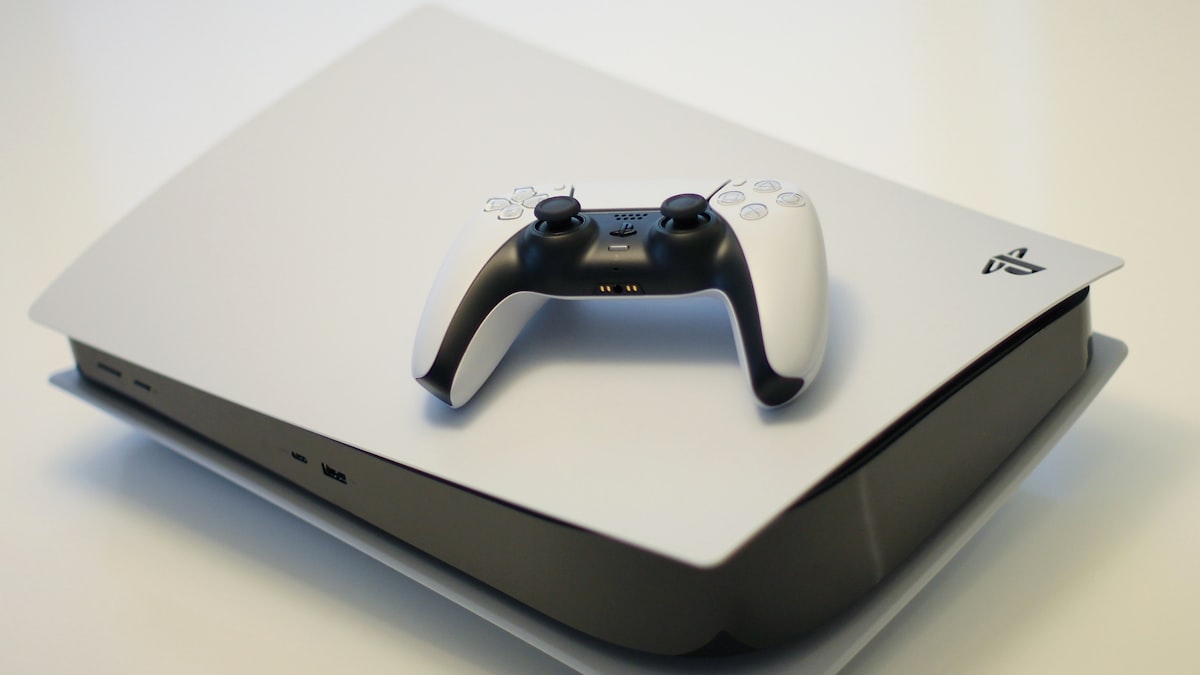
PS5 streaming has a unique audio problem. Unlike PC streaming where every audio source lives on one machine, console streamers need to extract game audio from HDMI, mix in their microphone, balance party chat against gameplay, and send everything cleanly to a capture card or streaming PC. This guide covers the best audio mixers for PS5 streaming, chosen for their ability to handle game/chat/voice routing, USB connectivity to your streaming PC, and value for console-specific setups. Every pick works with CreatorConfig so you can compare parts, check prices, and build your full PS5 streaming setup.
The Ruling
What is the best audio mixer for PS5?Get the Yamaha ZG02.
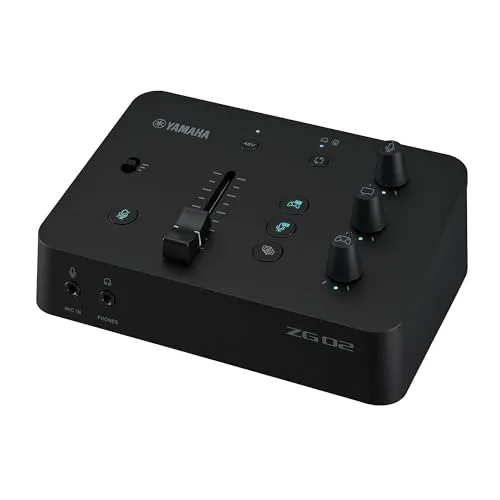
The Yamaha ZG02 is the best audio mixer for PS5 streaming, because it is the only mixer built specifically for console gaming: three dedicated hardware knobs for game, chat and voice let you turn down a shootout or a loud teammate without touching anything else, and a single USB cable hands OBS the finished mix as one clean source.
Unless…
- You want multitrack USB and sound pads — get the Zoom LiveTrak L-8.Its 12-in / 4-out interface gives OBS separate tracks for game, mic and pads, and six assignable pads beat keyboard shortcuts mid-match.
- You want broadcast processing in hardware — get the Rode RODECaster Duo.APHEX compression, de-essing and gating shape your voice before it reaches OBS, which the page calls transformative on a dynamic mic.
- You need more than one mic input — get the Rode RODECaster Pro II.The most complete console here for multi-mic shows.
The full ranking
- Best overall for PS5 streamers:Yamaha ZG02, dedicated game, chat, and voice controls
- Best value:Zoom LiveTrak L-8, sound pads, multichannel USB, independent monitor mixes
- Best budget:Behringer 802S, physical mixing and USB under $100
- Best premium:Rode RODECaster Duo, broadcast-quality hardware processing, compact
- Best for multi-person shows:Rode RODECaster Pro II, the most complete console for multi-mic production
Whichever you pick: the PS5 has no dedicated line-out port, so you will also need an HDMI audio extractor — or the optical output on the original disc-drive PS5 — to get game audio into any mixer.
At a Glance
How the three real contenders compare
The ZG02 is the smallest polygon here and still the right answer for most PS5 streamers, which is the whole point of the chart. It owns the one axis a console streamer touches every match and concedes the four that a solo setup with one microphone never uses. The L-8 and the Duo are bigger shapes bought for reasons that start outside the game.
Each spoke runs 0 at the center to 10 at the outer ring.
- Yamaha ZG02Our pick. The only console-first mixer here.
- Zoom LiveTrak L-8Take it instead for multitrack and sound pads.
- Rode RODECaster DuoTake it instead for broadcast processing.
| Category | Yamaha ZG02 | Zoom LiveTrak L-8 | Rode RODECaster Duo |
|---|---|---|---|
| Console Audio Control | 10/10 | 3/10 | 3/10 |
| Mic Inputs | 2/10 | 9/10 | 4/10 |
| Multitrack USB | 3/10 | 10/10 | 8/10 |
| Hardware Processing | 4/10 | 2/10 | 10/10 |
| Sound Pads | 1/10 | 9/10 | 9/10 |
Quick Comparison: Best Audio Mixers for PS5
Yamaha ZG02
PS5 Streamers
Zoom LiveTrak L-8
Best Value
Behringer 802S
Budget
Rode RODECaster Duo
Premium
Rode RODECaster Pro II
Ultimate Console
Yamaha ZG02
Key Specifications
The Yamaha ZG02 is the only mixer on this list designed from the ground up for console gaming. That matters when you are streaming from a PS5 because the biggest audio challenge is not microphone quality. It is managing game audio, party chat, and voice at the same time without Alt-tabbing out of your game or digging through OBS audio routing menus mid-match.
The ZG02 solves this with three dedicated hardware knobs on the front panel: one for game audio, one for chat, and one for your microphone. You can turn down an explosive shootout or a loud teammate without touching any other level. No other mixer at this price gives you that kind of console-specific control in a single box.
On the back, Yamaha provides a single XLR/TRS combo input with 48V phantom power and a built-in USB audio interface running at 24-bit / 48kHz. The USB connection sends your mixed audio directly to your streaming PC so OBS picks it up as a single clean source. That is the simplest way to get console audio into your stream without using HDMI audio extractors or optical splitters.
The ZG02 also includes a voice effects processor built into the ZG Controller app. You can add reverb, pitch shifting, or a noise gate without any external plugins. For PS5 streamers who want a compact, plug-and-play solution that covers game audio mixing, mic input, and USB output, the ZG02 is the most purpose-built option available.
Why it wins
- • Purpose-built for console gaming audio
- • Dedicated Game / Chat / Voice hardware knobs
- • Single USB connection sends clean mix to streaming PC
Skip if
- • You need more than one mic input
- • You want multitrack USB recording
- • You prefer software-based mixing control
Behringer 802S
Key Specifications
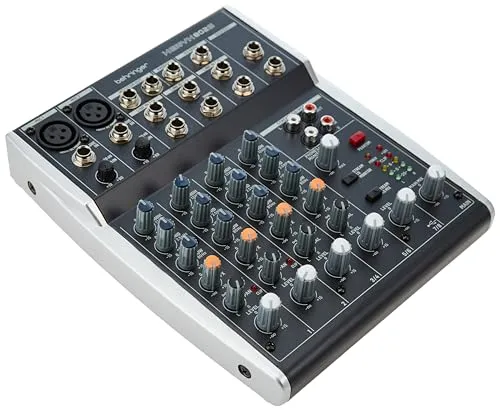
If you want physical audio control for your PS5 stream but do not want to spend over a hundred dollars, the Behringer 802S is the cheapest way to get there. It gives you eight inputs across two mono mic/line channels and three stereo channels, each with its own gain knob and level fader. That is enough to route your PS5 game audio, party chat, microphone, and alert sounds through separate physical channels.
The 802S does include USB audio, which Behringer rates at 48kHz / 16-bit stereo. That is not multichannel, so you will not get separate tracks in OBS for each input. What you get instead is a single mixed stereo feed sent over USB to your streaming PC. For most PS5 streamers who just want one clean audio source in OBS, that is perfectly fine.
There are no built-in DSP effects. The 802S offers an external FX send if you want to add a reverb or compressor later, but out of the box it is pure analog mixing. The preamps are functional rather than studio-grade, so expect a slightly higher noise floor compared to more expensive options. For under a hundred dollars, the 802S gives you physical faders, multiple inputs, and USB connectivity, which is more than enough to get a PS5 stream sounding professional.
Why it wins
- • Most affordable mixer with USB for PS5 streaming
- • Eight physical inputs for routing multiple sources
- • Simple analog signal path, easy to set up
Skip if
- • You need built-in DSP or digital effects
- • You want multitrack recording per channel
- • You want purpose-built console gaming controls
Zoom LiveTrak L-8
Key Specifications
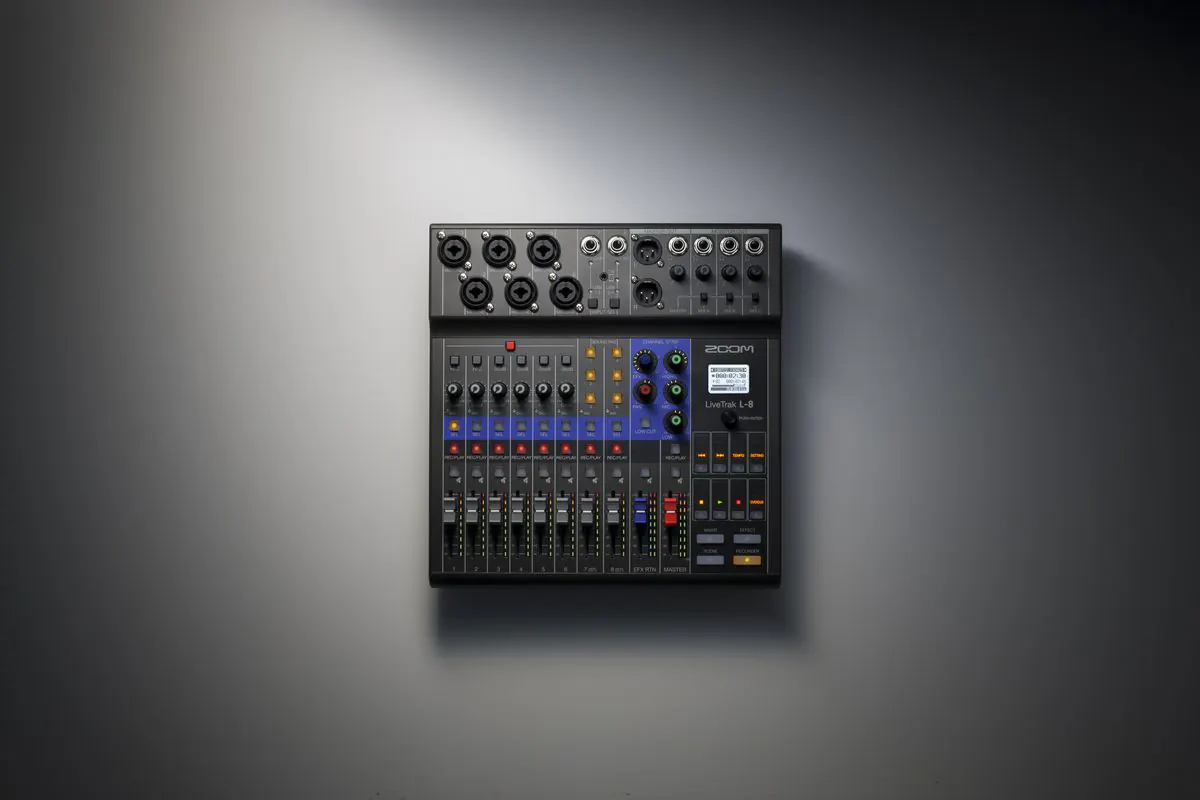
The Zoom LiveTrak L-8 is the most versatile mixer on this list for the price. It combines eight input channels with a 12-in / 4-out USB audio interface, six assignable sound pads, and three custom monitor mixes plus the main mix. That feature set covers almost everything a PS5 streamer could need in a single box.
The six sound pads are the standout feature for streaming. You can load them with intro music, transition stingers, donation alerts, or sound effects and trigger them with a physical tap during your broadcast. That is more reliable than keyboard shortcuts or OBS scene switchers, especially during intense gameplay where you do not want to look away from the screen.
The 12-in / 4-out USB interface is significantly more capable than the stereo USB on the Behringer 802S. It lets you send multiple channels into your streaming PC simultaneously, which means you can set up separate audio tracks in OBS for game audio, microphone, and sound pads. That level of control over your stream audio is usually only available on much more expensive hardware.
The three independent monitor mixes are useful if you want to send different audio balances to your headphones versus what goes to the stream. For example, you can run more game audio to your own ears while keeping voice and alerts balanced for viewers. At this price, the L-8 is hard to beat for PS5 streamers who want both mixing flexibility and creative tools.
Why it wins
- • Multichannel 12-in / 4-out USB for separate OBS tracks
- • Six assignable sound pads for stream effects
- • Independent monitor mixes for you vs. viewers
Skip if
- • You only need basic stereo mixing
- • You want premium APHEX-style processing
- • You need a more compact desktop form factor
Rode
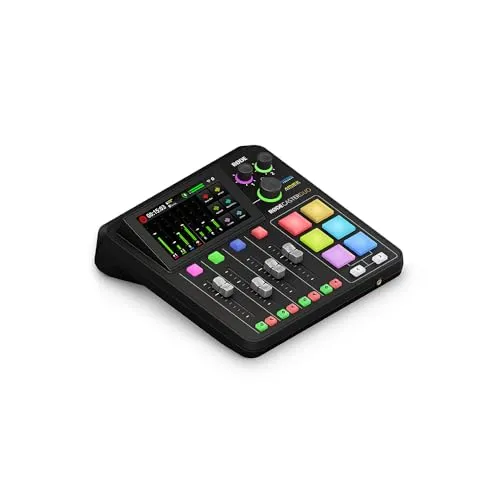
RODECaster Duo
Key Specifications
The Rode RODECaster Duo is one of the most well-known broadcast mixers in the streaming world, and it works just as well for PS5 streaming as it does for PC-only setups. It features two combo XLR/TRS inputs with Rode's high-gain Revolution Preamps, built-in APHEX audio processing, and a multichannel USB interface that sends separate audio sources directly into OBS.
The APHEX processing is what sets the RODECaster apart from every other mixer on this list. It gives you hardware-based compression, de-essing, noise gating, and an exciter that shapes your voice before it ever reaches OBS. That means your stream audio sounds polished and broadcast-ready without any software plugins. For PS5 streamers who use dynamic microphones like the Shure SM7B or Electro-Voice RE20, the built-in processing is genuinely transformative.
The color touchscreen makes it easy to adjust effects, set levels, and configure routing without connecting to a computer. Six programmable sound pads can store audio files or trigger MIDI commands for OBS scene changes. The Duo also has Bluetooth input for piping in phone audio, which is useful if you take call-ins or play music from your phone during downtime.
As a USB audio interface, it appears as a multichannel device in OBS. That means you can route your microphone, sound pads, and PS5 audio as separate tracks and adjust their levels independently in your streaming software. At $499, it is a serious investment, but no other mixer at this size delivers the same level of hardware audio processing and creator-focused features.
Why it wins
- • Broadcast-grade APHEX processing for polished voice
- • Multichannel USB for separate OBS audio tracks
- • Compact size with touchscreen and SMART pads
Skip if
- • You need more than two mic inputs
- • You are on a tight budget
- • You do not need hardware audio processing
Rode
RODECaster Pro II
Key Specifications
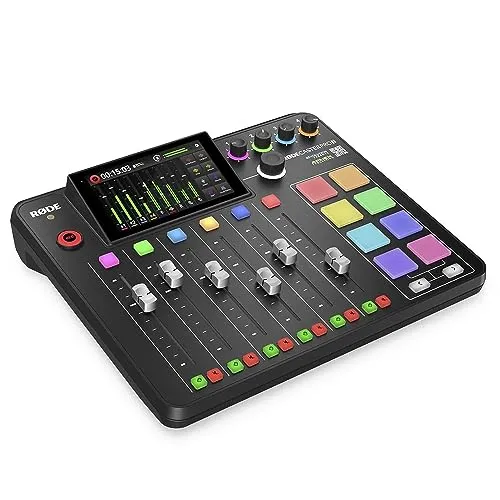
The Rode RODECaster Pro II is the most capable all-in-one production mixer available for content creators. It expands on the Duo with four combo XLR/TRS inputs, eight programmable SMART pads, and a larger control surface that gives you faster access to routing and effects in multi-person setups.
The four high-gain preamps each deliver up to 76dB of gain, which is enough to drive any dynamic microphone on the market at full volume with clean headroom. The full APHEX processing suite includes a four-channel equalizer, compressor, noise gate, de-esser, and the signature Aphex Aural Exciter and Big Bottom processors. Every effect chain can be saved as a preset and recalled instantly, which is useful if you switch between solo streaming and co-op broadcasts with different microphone configurations.
For PS5 streamers who run multiplayer shows or co-stream with friends on the same setup, the four microphone inputs and eight SMART pads make the Pro II a true production console. It supports Bluetooth input for wireless audio, has dual USB-C interfaces, and can record directly to a microSD card as a backup. The eight SMART pads offer more storage and flexibility than the Duo's six, with support for longer audio files and more complex trigger configurations.
At $699, the Pro II is the most expensive option in this guide. It is best suited for PS5 streamers who treat their broadcast as a professional production and need the flexibility to handle multiple microphones, complex audio routing, and hardware processing in a single device. If that describes your workflow, nothing else comes close.
Why it wins
- • Four mic inputs with full per-channel APHEX processing
- • Eight SMART pads for complex stream productions
- • Complete production hub with microSD recording
Skip if
- • You only need one or two mic inputs
- • The price is beyond your budget
- • You do not need hardware processing or multi-mic support
How to Connect a Mixer to Your PS5 for Streaming
Getting audio from your PS5 into a mixer and then into your streaming PC requires a bit of routing. The PS5 does not have a dedicated line-out port, so you need to extract audio from either the HDMI connection or the controller headphone jack. Compare these PS5 mixers side by side to see which one handles your specific routing needs. Here is how each method works and which mixers handle it best.
1. HDMI Audio Extractor (Recommended)
The most reliable way to get PS5 audio into a mixer is an HDMI audio extractor. You plug your PS5 HDMI into the extractor, the extractor sends video to your capture card or monitor, and the analog RCA or 3.5mm output carries game audio to a line input on your mixer. This gives you a clean, full-range audio signal and works with every mixer on this list.
2. Optical Audio (Original PS5 Only)
If you have the original disc-drive PS5 model, it has an optical audio output on the back. You can run an optical-to-analog converter from that port into any line input on your mixer. The PS5 Slim Digital Edition does not have an optical port, so this method only works with the launch model.
3. USB Mixers Send Audio Directly to Your PC
Every mixer on this list has a USB connection. Once your game audio and microphone are mixed on the hardware, the USB output sends the combined signal to your streaming PC. OBS recognizes it as an audio input device, and you can assign it as your stream audio source. Multichannel mixers like the Zoom LiveTrak L-8 and Rode RODECaster line can send separate tracks, which gives you more control in OBS.
4. Party Chat Requires Extra Routing
PS5 party chat audio comes through the controller, not the HDMI output. To mix party chat with game audio, you either need to run the controller headphone output into a mixer channel using a 3.5mm cable, or use a headset connected directly to your streaming PC with Discord running on a second screen. The Yamaha ZG02 is the only mixer here with a dedicated chat input that handles this routing natively.
If you are also looking for a microphone to pair with your mixer, our XLR mixer guide covers which mixers accept XLR microphones and which mic and mixer combinations work together. For more setup detail see our best audio mixer for streaming guide, or browse the parts database for compatible microphones and accessories. If you prefer a simpler setup without physical mixing controls, our best audio interface for streaming guide covers compact alternatives.
Frequently Asked Questions
What is the best audio mixer for PS5?
The Yamaha ZG02 is the best audio mixer for PS5 streaming. It is the only mixer built specifically for console gaming, with dedicated game, chat, and voice controls. On a tight budget the Behringer 802S gives you physical mixing and USB connectivity for under $100, while the Zoom LiveTrak L-8 offers the best overall combination of features and value.
Can you connect an audio mixer directly to a PS5?
Not directly. The PS5 has no dedicated line-out port, so game audio has to be extracted first. The most reliable method is an HDMI audio extractor: the PS5 HDMI runs into the extractor, video passes through to your capture card or monitor, and the analog RCA or 3.5mm output carries game audio to a line input on your mixer.
Does the PS5 have an optical audio output for a mixer?
Only the original disc-drive PS5 has an optical audio output. If you have that model you can run an optical-to-analog converter from the port into any line input on your mixer. The PS5 Slim Digital Edition has no optical port, so it requires an HDMI audio extractor instead.
How do you get PS5 party chat into your stream?
PS5 party chat audio comes through the controller rather than the HDMI output. You either run the controller headphone output into a mixer channel with a 3.5mm cable, or use a headset connected to your streaming PC with Discord on a second screen. The Yamaha ZG02 is the only mixer in this guide with a dedicated chat input that handles this routing natively.
Does a USB mixer send audio to the PS5 or to your PC?
A USB mixer sends the combined signal to your streaming PC, not back to the PS5. Once game audio and your microphone are mixed on the hardware, OBS recognises the mixer as an audio input device and you assign it as your stream audio source. Multichannel mixers such as the Zoom LiveTrak L-8 and the Rode RODECaster line can send separate tracks for more control in OBS.
Final Thoughts
The best audio mixer for PS5 streaming is the one that handles your specific routing needs without adding complexity. The Yamaha ZG02 is our top pick because it is the only mixer designed specifically for console gaming, with dedicated game, chat, and voice controls that no other option at this price matches.
If you are on a tight budget, the Behringer 802S gets you physical mixing and USB connectivity for under a hundred dollars. For the best combination of features and value, the Zoom LiveTrak L-8 adds sound pads, multichannel USB, and independent monitor mixes. For broadcast-quality hardware processing, the Rode RODECaster Duo delivers in a compact form factor. And for professional multi-mic production, the Rode RODECaster Pro II is the most complete console available.
Whatever you choose, the key is getting your PS5 game audio and microphone into the same hardware mixer so you can adjust levels in real time while you play. For pairing your mixer with a capture card, see our best capture cards for PS5 guide. If you want to build a complete PS5 streaming setup, use our Creator builder tool to plan everything around your mixer, or browse completed setups from other console streamers for inspiration.
For neutral technical references, see the Mixing console overview on Wikipedia and the official OBS Studio knowledge base.